
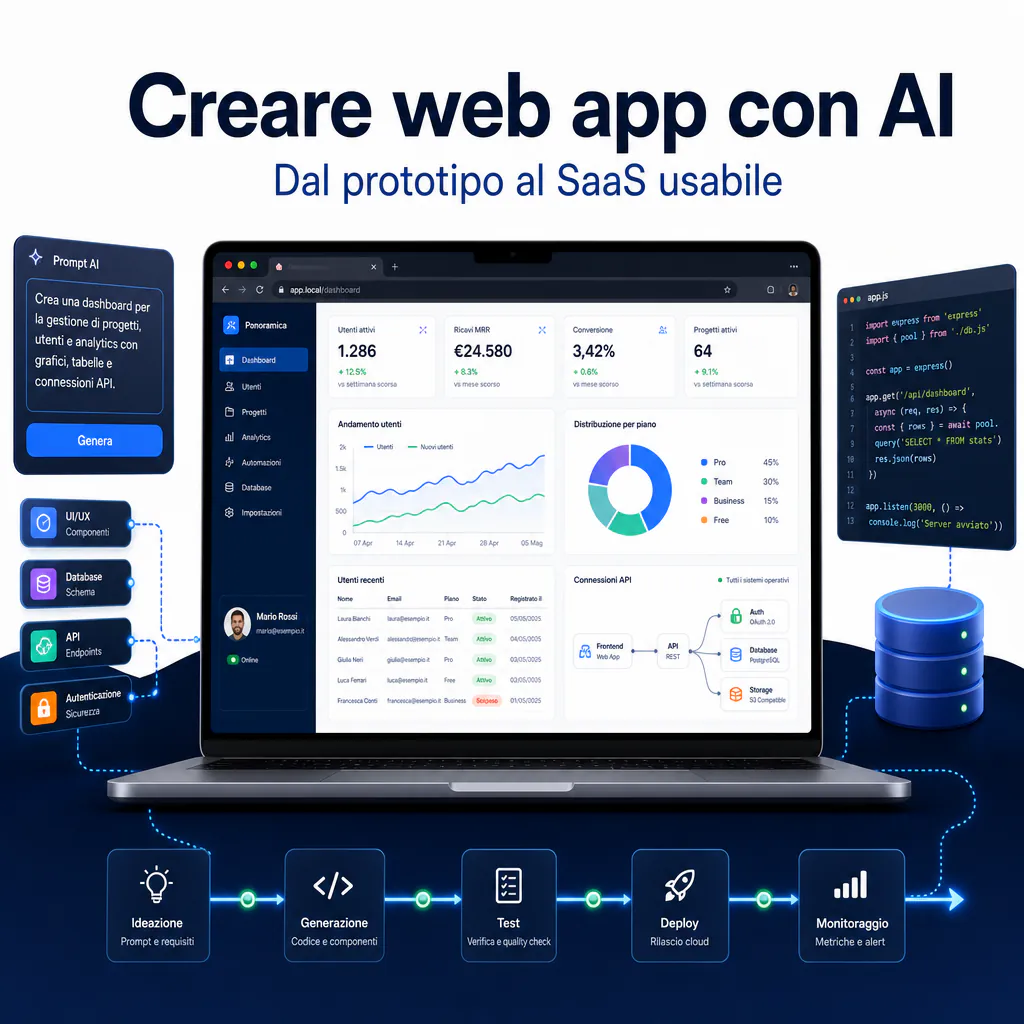
Creating web apps with AI today doesn’t mean asking a chatbot to generate a few static pages. It means using AI tools to build small software in the browser: a dashboard, a lightweight CRM, a calculator, an internal management tool, a SaaS prototype, or a tool connected to APIs and databases. If you’re starting from scratch, the first sensible step is to understand the difference between a simple experiment and a usable product: for this, it may also be useful to read the guide on how to create apps with AI starting from a real MVP.
The promise of AI tools is strong: describe what you want, get code, interfaces, tables, logins, dashboards, and integrations. But in practice, the result depends on how you set up the project. A useful web app isn’t born from a good prompt alone. It requires a clear use case, an understandable data flow, access rules, testing, corrections, and a minimum architecture.
The point isn’t “can AI do everything?”. The point is: which parts can it accelerate without creating a fragile prototype that is difficult to maintain or risky for company data?
Creating web apps with AI: what it really means
A web app is an application accessible via a browser. It may look like a website, but it behaves like software. The user enters, fills in data, consults information, performs actions, saves records, generates reports, or activates automations.
When we talk about creating web apps with AI, we are talking about using generative models and assisted development tools to produce one or more parts of the application:
- user interface;
- page structure;
- frontend components;
- database schema;
- backend logic;
- API calls;
- authentication;
- debugging and error correction;
- minimum technical documentation.
The difference compared to traditional development is that AI can transform a functional description into a first navigable version. This reduces the time needed to validate an idea, especially when the project doesn’t immediately require a complex infrastructure.
Difference between website, internal tool, and mini SaaS
A website presents content. A web app allows you to do something. This distinction is important because it completely changes the technical choices.
A showcase site can have pages, forms, blogs, and landing pages. A web app, on the other hand, almost always has users, data, permissions, and actions. Even an advanced calculator or an internal dashboard is a web app if it processes input, saves data, or returns dynamic results.
An internal tool can serve a sales team to monitor leads, an operations department to manage tasks, an e-commerce to check problematic orders, or a consultant to generate quotes. A mini SaaS adds another level: more customers, separate accounts, subscriptions, onboarding, and data management for each company.
When AI truly accelerates development
AI accelerates most when the problem is clear. If you know what the app must do, what data it must manage, and which screens are needed, an AI web app builder can quickly create a concrete base.
It works well for:
- prototypes to show to clients, partners, or investors;
- internal dashboards with already available data;
- lightweight CRMs for small teams;
- commercial calculators or quote generators;
- tools for analyzing files, texts, or requests;
- interfaces connected to Make.com, Airtable, Supabase, or external APIs.
It works less well when the project has many hidden rules, complex domain logic, strong legal requirements, or sensitive data that hasn’t been governed yet. In those cases, AI can help, but it shouldn’t decide the architecture on its own.
Choosing the right AI web app builder
An AI web app builder is a tool that generates parts of an application based on natural language instructions. Some are oriented toward no-code, others generate editable code, and others function as complete development environments in the browser.
In 2026, the market is much more mature than the first code generation experiments. Tools like Lovable, Bolt, v0, Replit Agent, Cursor, Windsurf, and similar solutions allow you to start from prompts, screenshots, functional briefs, or existing repositories. But they are not interchangeable.
The choice depends on three practical questions:
- do you only need a visual prototype or an app connected to real data?
- do you want to maintain control over the code?
- do you need to integrate databases, logins, automations, and APIs?
Visual tools, AI editors, and vibe coding environments
Visual tools are convenient when the goal is to quickly obtain an interface. They are useful for interactive landings, demonstration dashboards, and prototypes to validate. The limit is that they often become rigid when you want to customize logic, permissions, or integrations.
AI editors, instead, work within a real project. You can request changes, fix bugs, add components, refactor files, and connect external services. They are more powerful but require more attention. If you don’t understand what the AI is modifying, you risk accumulating fragile code.
Vibe coding environments are in the middle. They allow you to describe the product, see a preview, correct step-by-step, and obtain a functioning base. They are very effective when the project is small, the flow is clear, and the first version needs to come out quickly.
Practical limits of AI web app builders in B2B projects
In B2B, the problem isn’t just “does it work on my screen?”. The problem is whether the app can be used without creating risks. A prototype may look perfect but fail on trivial aspects: wrong permissions, data visible to unauthorized users, exposed API keys, unhandled errors, poor performance, or a poorly designed database.
For this reason, an AI web app builder should be used as an accelerator, not as a substitute for technical thinking. It’s great for starting, visualizing, testing, and iterating. But before using the web app with real data, a serious review is needed.
If the goal is to compare tools and understand which one to choose based on the use case, you can also delve into the guide dedicated to AI app builders and choosing the right tool.
Creating web apps with AI starting from a concrete use case
The worst way to start is by writing: “create a modern web app for my company”. It’s too generic. The AI will fill in the gaps with random choices, often beautiful to look at but not very useful.
The correct way is to start from the work the app must perform. A web app shouldn’t be “beautiful” in the abstract. It must reduce time, errors, manual steps, or dependence on scattered spreadsheets.
A good initial brief should include:
- who uses the app;
- what problem it solves;
- what data goes in;
- what data comes out;
- what actions the user can take;
- which screens are necessary;
- which integrations are needed;
- which data must never be exposed.
Dashboards, lightweight CRMs, calculators, and operational tools
The best first AI web apps are small and specific. A dashboard to read KPIs from multiple sources. A lightweight CRM to track leads and follow-ups. A calculator for quotes. An internal panel to transform customer requests into tasks. A tool that takes a CSV file, cleans it, and returns a report.
These cases work because they have clear boundaries. You aren’t building “a platform”. You’re building a tool with a precise purpose.
For example, a B2B company could create an internal web app to analyze requests coming from forms, assign priority, generate a draft response, and send the data to Make.com. AI can help generate the interface, the data model, and the initial logic. But the value comes from the process, not the generated code.
How to write functional prompts to create web apps with AI
An effective prompt doesn’t just describe the look of the app. It describes behavior, data, and constraints.
A good prompt can follow this structure:
- context: “I’m creating an internal web app for a B2B agency”;
- user: “The sales team will use it”;
- goal: “Manage leads and operational priorities”;
- screens: “Dashboard, lead list, lead detail, settings”;
- data: “company name, website, email, score, status, notes, next follow-up”;
- actions: “create, edit, filter, assign, export”;
- integrations: “Make.com webhook to send qualified leads”;
- constraints: “do not show data from other users, do not save API keys in the frontend”.
When you want to create web apps with AI, the clarity of the prompt directly affects the quality of the code. A vague prompt produces a demo. An operational prompt produces a workable base.
Frontend, database, and APIs: the minimum architecture
A useful web app has at least three levels: interface, data, and logic. The interface allows the user to interact. The database stores the information. APIs connect the app to other services or allow the frontend to communicate with the backend.
Many AI prototypes fail because they generate the frontend well but treat data and security as details. In reality, they are the most important part if you want to move from demo to real use.
For a simple MVP, the minimum architecture can be:
- frontend in React, Next.js, or a similar framework;
- managed Postgres database, for example via Supabase;
- authentication with email, magic link, or external providers;
- server-side APIs for sensitive operations;
- webhooks to Make.com or other automation tools;
- hosting with automatic deployment from a Git repository.
Connecting interface, authentication, and persistent data
The critical step is data persistence. A web app without a database may be fine for a demo, but not for actual work. As soon as the user needs to save leads, customers, files, tasks, reports, or configurations, a properly designed database is needed.
Supabase is often chosen in AI projects because it combines Postgres, authentication, storage, and automatically generated APIs. This makes it suitable for rapid prototypes, but it doesn’t eliminate the need to properly define tables, permissions, and policies.
A simple rule: every table must have a clear purpose. If you’re creating a lightweight CRM, you might have tables like companies, contacts, opportunities, activities, and users. If you’re creating a calculator, you might save inputs, results, model versions, and simulation history.
Authentication shouldn’t be added at the end. It must be considered from the start. Who can see what? Who can edit what? Does an admin see all data? Does a client see only their own space? These answers condition the database and interface.
Integrating external APIs, Make.com, and business automations
A web app becomes much more useful when it doesn’t remain isolated. It can send data to Make.com, receive updates from a CRM, read orders from WooCommerce, generate documents, notify Slack, update Google Sheets, or create tickets.
Here, AI can help write functions, endpoints, and payloads. But one must carefully check how tokens, errors, and sensitive data are handled. API keys must not end up in the frontend. Delicate calls must pass through server-side functions or protected backends.
For WordPress or corporate projects, it may make sense to connect the web app to an existing site instead of rebuilding everything. For example, a company can keep the marketing site in WordPress and use a separate web app for dashboards, quotes, or an operational area. In this scenario, it’s also useful to understand when it’s better to create a website with AI and when a real application is needed instead.
Generative AI app builders and no-code AI app builders
The terms generative AI app builder and no-code AI app builder are often used as synonyms, but they indicate different approaches.
A generative AI app builder produces code, components, structure, and logic based on instructions. It can generate a React app, create screens, propose a data schema, and modify files. It’s useful when you want a technical output that can be exported or modified.
A no-code AI app builder, instead, aims to reduce contact with code as much as possible. The user works via prompts, visual interfaces, blocks, integrated databases, and guided automations. It’s more accessible but can become limiting if the project grows.
| Approach | When it’s convenient | Main risk |
|---|---|---|
| Generative AI app builder | When you want editable code and greater technical control | Generated code not always consistent or secure |
| No-code AI app builder | When you want to quickly validate an operational flow | Limits on customization, scalability, and portability |
| AI Editor on repository | When you already have a project and want to iterate faster | Too broad changes if prompts aren’t precise |
When to use a generative AI app builder
A generative AI app builder is suitable when you want to create a real technical base. For example, if you want to generate a dashboard with login, tables, filters, forms, and a connection to Supabase, a generative tool can create a first architecture much faster than manual development.
It’s a good choice if:
- you want to export the code;
- you have or will have a developer who can review it;
- you anticipate custom integrations;
- you don’t want to be locked into a closed platform;
- you need to build a product that can evolve.
The advantage is speed. The risk is false security. The code may look tidy but hide duplications, inconsistent logic, or missing checks. Before putting real data online, a review phase is always necessary.
When to choose a no-code AI app builder
A no-code AI app builder is useful when the problem is operational and the technical risk is low. For example, a small internal management tool, a portal to collect requests, an approval system, or an interface to consult non-sensitive data.
The strength of no-code is the speed of validation. You can find out if the flow is actually needed before investing in custom development. For a B2B company, this is often the most important point: avoiding months of work on a product that no one will use.
The limit emerges when complex rules, performance, full control over data, or non-standard integrations are needed. At that point, it’s better to move to a more solid base, keeping what was learned from the prototype.
From fragile prototype to usable web app
The AI-generated prototype is only the beginning. The usable version is born when you start testing, breaking, correcting, and simplifying. A web app isn’t ready just because “it opens”. It’s ready when it handles errors well, protects data, and allows users to complete their work without confusion.
Moving from demo to product requires some concrete checks:
- is data saved correctly?
- do permissions prevent unauthorized access?
- are API keys protected?
- are errors handled with understandable messages?
- does the app work even with incomplete data?
- does the interface remain clear on mobile and desktop?
- do automations not trigger twice by mistake?
- can the code be modified without rewriting everything?
How to identify and fix AI-generated errors
The most common errors in AI-generated projects aren’t always obvious. Sometimes the app works in the ideal case but breaks as soon as a user enters different data, refreshes a page, loses connection, or tries an unforeseen flow.
Typical errors are:
- duplicate components with slightly different logic;
- frontend states not synchronized with the database;
- validations present in the interface but absent on the server side;
- permissions applied only graphically;
- inefficient queries;
- incomplete handling of loading, errors, and empty fields;
- dependencies installed without real necessity;
- code difficult to read because it was generated in blocks that are too large.
The most practical way to fix them is to work in small steps. Don’t ask the AI to “fix the whole app”. Ask it to fix a specific bug, indicating the file, expected behavior, actual behavior, and error message.
For example: “In the lead creation form, when the email field is empty, the save still succeeds. Add client-side and server-side validation, show a clear message, and do not modify other components”. This type of request reduces unnecessary changes and maintains control over the project.
Testing, security, performance, and maintenance before launch
Before letting clients or internal teams use an AI-generated web app, a minimum checklist is needed. It shouldn’t be bureaucratic. It should avoid costly mistakes.
On the security front, today it’s fundamental to also consider the specific risks of applications with language models. OWASP guidelines for LLM applications highlight problems like prompt injection, insecure output handling, exposure of sensitive information, and excessive dependence on model behavior. Even if your app uses AI only to generate text or analyze data, these risks must be taken seriously.
For a B2B web app, check at least:
- no API keys in the frontend code;
- database policies consistent with user roles;
- server-side input validation;
- logs of main errors;
- backup or export of important data;
- test environment separate from production;
- deploy tracked via Git;
- clear limits on automatic actions performed by AI.
Performance matters especially when the app handles many rows, filters, or dashboards. A table with ten records may seem fluid. With ten thousand, it can become unusable. For this reason, it’s better to test early with realistic data, not just fake examples.
Maintenance is the last point, but it often decides the fate of the project. If every change requires fear, the app will be abandoned. If, instead, the code is tidy, the database is understandable, and the flows are documented, AI can continue to help even after launch.
When an AI web app should become a product
Not all prototypes should become products. Some serve only to validate an idea, show a flow, or understand if a process deserves automation. The risk, especially with very fast tools, is mistaking ease of generation for real value.
An AI web app deserves to evolve when it’s actually used. If a team opens it every day, reduces manual work, avoids errors, or generates business opportunities, then it makes sense to consolidate it.
Positive signs are clear:
- users ask for specific improvements;
- the tool replaces an Excel sheet used every day;
- the data collected helps operational decisions;
- the app reduces time or repetitive steps;
- the connected process produces revenue, savings, or greater control.
In these cases, it’s better to move from “generated prototype” to “maintainable version”. This means reviewing code, permissions, database, flows, interface, and monitoring.
Validate before complicating
The temptation is to immediately add advanced logins, complex roles, payments, notifications, charts, admin area, and multiple integrations. But the priority is to validate the main flow.
If you’re creating a dashboard, the main flow is reading data and making decisions. If you’re creating a lightweight CRM, it’s managing leads without losing follow-ups. If you’re creating a calculator, it’s producing a reliable and understandable result.
Everything else comes after. AI makes it easy to add functions, but every added function increases maintenance, testing, and the possibility of error.
Extending toward mobile, Android, and other channels
After creating a solid web app, the need to bring it to mobile may arise. It’s not always necessary to immediately create a native app. Often a responsive web app or a PWA is enough for internal use, dashboards, and B2B tools.
If, instead, advanced push notifications, access to device functions, or distribution via stores are needed, then it makes sense to evaluate a mobile app. In that case, the reasoning changes: API architecture, authentication, and database must be ready to serve multiple clients, not just the browser.
To understand when the jump makes sense, you can also delve into the topic of creating Android apps with AI, useful when the project must leave the browser and become a more structured mobile experience.
Practical process to build without losing control
The most solid way to create web apps with AI is to treat AI as a fast collaborator, not as an autonomous technical decision-maker. You define the goal, constraints, and priorities. The tool generates, proposes, and modifies. Then you verify.
A simple process could be this:
- write the use case on a page;
- define users, data, screens, and actions;
- create a first prototype with an AI web app builder;
- test the flow with realistic data;
- eliminate useless functions;
- connect database and authentication;
- add integrations only where needed;
- fix bugs one by one;
- do a security review before launch;
- bring the code into a manageable Git flow.
This approach avoids two opposite errors: staying stuck in theory or publishing a fragile demo as if it were a product. The goal is to quickly reach a usable version, but with enough control to be able to improve it.
Prompts, documentation, and versions
Every important change should be accompanied by a short note: what was changed, why, which files were touched, and how to test the result. Heavy documentation isn’t needed. A minimum trace is needed.
With AI tools, this is even more important because a single request can modify many files. If you don’t keep track of versions, it becomes difficult to understand when a bug was introduced.
Using Git, even simply, is a concrete protection. It allows you to go back, compare changes, and separate experiments from stable versions.
Role of the human expert in the project
AI can generate code, but it doesn’t truly know your business. It doesn’t know which data is sensitive, which flows are critical, which errors cause commercial damage, and which technical shortcuts will become a problem in three months.
For this reason, the human role remains central. Someone is needed who knows how to transform a business need into requirements, choose the tools, check security, evaluate if a function is truly needed, and decide when to stop.
In the B2B context, the value isn’t having “a web app made with AI”. The value is having a tool that solves an operational problem, integrates with existing processes, and can grow without becoming unmanageable.