
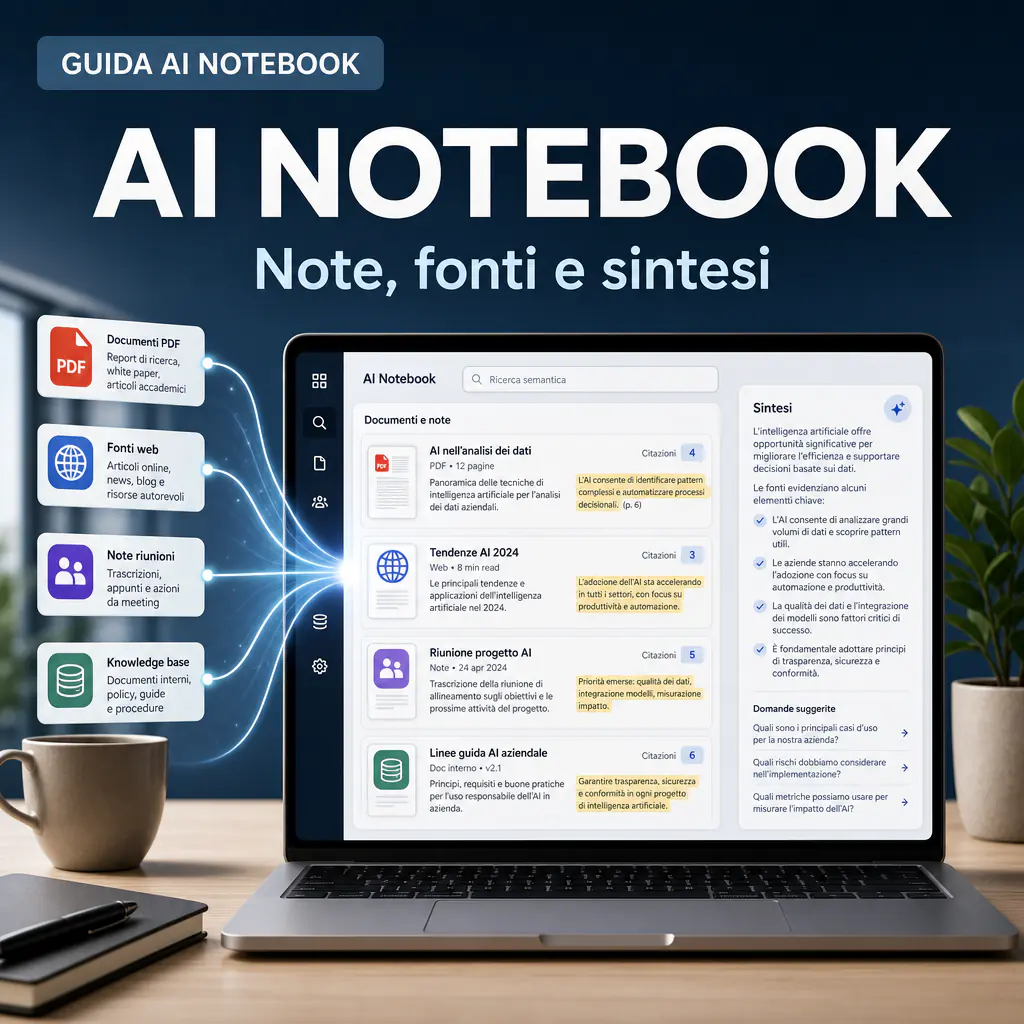
AI notebooks are not just simple note-taking apps. They are workspaces where you can upload documents, link sources, ask questions about the content, and obtain summaries with verifiable references. The difference is significant: a digital notepad stores information, while an AI-powered notebook helps you find, compare, and transform it into useful output.
Those looking for this type of tool usually have a concrete need: to study faster, organize research, manage business documents, summarize long materials, or build a searchable knowledge base. The point is not just “having AI in your notes,” but understanding if the tool actually improves the workflow.
In recent years, this category has grown substantially. Tools like Google NotebookLM, Notion AI, Mem, Evernote AI, Obsidian with AI plugins, and other solutions have normalized the idea of querying documents, PDFs, web pages, meeting notes, and knowledge bases. However, not all tools do the same thing, and not all are suitable for professional use.
What are AI notebooks and why are they changing digital notes
An AI notebook is a space where notes, sources, and language models work together. Instead of opening a document, reading it, copying passages, and manually creating a summary, you can upload multiple materials and ask the tool to help you interpret them.
The most useful functionality is based on a simple logic: the AI should not answer solely from “memory,” but must use the content you provided. This approach reduces the risk of vague answers and makes it easier to check where a piece of information comes from.
The promise is strong, but it must be understood correctly. An AI notebook does not replace human judgment. It is more like a reading, research, and organization assistant. It can accelerate repetitive tasks, but it still requires organized sources, precise questions, and a critical review of the outputs.
Differences between a traditional notepad and an AI workspace
A standard digital notepad is used to write, store, and retrieve content. It may have tags, folders, text search, and cloud synchronization. It is useful, but it remains passive: you are the one who must remember what to search for and how to link information.
An AI notebook adds an operational layer. You can ask “what are the common points between these documents?”, “what risks emerge from these project notes?”, or “create a summary with citations from the uploaded sources.” This changes how you work with large amounts of text.
The practical difference is most evident when sources increase. With ten PDFs, twenty pages of notes, and several meeting transcripts, manual searching becomes slow. An AI notebook can help find patterns, contradictions, and relevant passages in a few minutes.
When a notebook becomes useful for study, research, and business
For studying, an AI notebook is useful when you need to transform long materials into outlines, questions, concept maps, or flashcards. Google NotebookLM, for example, has focused heavily on summary functions, citations, and content generated from sources. In Google’s official documentation and updates, it is described as a tool for working with your own materials, with features like Audio Overview and Video Overview in multiple languages.
For research, the value lies in the ability to compare different sources. A researcher, consultant, or marketer can upload reports, interviews, briefs, and competitor analyses, then request a cross-reading. It is not a shortcut to avoid verification, but a way to speed up the initial analysis phase.
In a business setting, the most interesting use case is document management. Policies, procedures, manuals, minutes, offers, tickets, and commercial documents can become more accessible if organized in a searchable space. However, this is where privacy, permissions, and governance come into play.
Key features of a modern AI notebook
When evaluating an AI notebook, avoid stopping at the generic promise of “summarizing notes.” Almost all tools claim to do this today. The real difference lies in the quality of supported sources, the precision of citations, project management, and the controls available for teams and companies.
The features to observe are few but decisive: material upload, semantic search, traceable answers, automatic summaries, note organization, collaboration, export, and security.
Uploading documents, web sources, PDFs, and internal materials
A good AI notebook must allow working with different formats. PDFs, text documents, web pages, transcripts, meeting notes, and internal files are often part of the same project. If the tool only supports notes written by hand within the app, its value is reduced.
Source management is central. You must be able to understand which documents have been uploaded, which are active in the project, and which are used to generate answers. In business workflows, this detail avoids confusion: you don’t want a commercial summary using an old draft or an unapproved document.
For those working in Italian, it makes sense to evaluate linguistic performance. Some tools handle multilingual sources well, others are more effective in English. Before adopting a platform, it is advisable to test it with real documents: contracts, offers, technical pages, reports, and long content.
Semantic search, answers with citations, and source control
Semantic search is different from keyword search. If you search for “delivery delay,” a semantic system can also find passages talking about “timeline shift” or “release postponement.” This is one of the reasons why AI notebooks are useful in complex projects.
Citations are equally important. An answer without references may seem convincing, but it is hard to verify. An answer with clickable citations allows you to return to the original document and check if the summary is correct.
According to Google’s official pages on NotebookLM, overviews are generated from the notebook’s content. Notion, in its documentation on Enterprise Search, also highlights search across workspaces and connected apps with source citations. These are clear signals: the market is moving toward tools that don’t just produce text, but help trace information back to its origin.
How to use an AI notebook for summaries and operational knowledge
The best way to use an AI notebook is not to upload everything and ask “give me a summary.” It works better if you set up an orderly flow: choose the sources, define the purpose, ask progressive questions, and transform the answers into reusable notes.
This approach applies to students, consultants, marketing teams, customer care departments, and companies with extensive internal documentation. AI performs best when working within a clear perimeter.
Workflow for summaries, notes, and sources without losing context
One of the most frequent needs is using language models to transform notes and sources into structured summaries. But the quality of the result depends on the context you provide and how you separate materials, questions, and results.
A practical workflow can follow these steps:
- create a notebook for each project, client, or area of study;
- upload only relevant and updated sources;
- rename documents clearly;
- first ask for a map of the main themes;
- then ask for targeted summaries, comparisons, and operational lists;
- always check citations before using the output.
To delve deeper into the topic of reusable notes, it makes sense to link this flow to a guide dedicated to AI for notes, because the value is not just in the summary. It’s in the ability to create material you can use multiple times: briefs, checklists, procedures, emails, internal documentation, and operational scripts.
Automatic summaries, insight extraction, and document comparison
Automatic summary is the most obvious use case, but not always the most important. A generic summary can be useful for orientation, but the real advantage comes when you ask for more specific outputs.
Practical examples:
- “List the differences between these three quotes.”
- “Find the operational risks mentioned in the minutes.”
- “Summarize only the parts relevant to the marketing department.”
- “Create a table with problems, causes, impact, and possible actions.”
- “Identify missing information before sending the offer.”
These requests are more useful than a simple “summarize everything” because they lead to decisions. In a B2B context, an AI notebook should reduce wasted time, double readings, and manual steps between different tools.
| Use | Useful Output | Risk to Control |
|---|---|---|
| Study | Outlines, questions, flashcards, concept maps | Over-simplification of content |
| Research | Comparison between sources, citations, recurring patterns | Unverified interpretations |
| Business Team | Procedures, meeting summaries, document analysis | Permissions, privacy, and obsolete sources |
| Marketing | Briefs, customer insights, content reuse | Too generic outputs or not brand-aligned |
How to choose the right AI notebook app
The risk is confusing different categories. Some apps are born for note-taking, others for managing business knowledge, and others still for analyzing documents. Before choosing, you need to understand the work to be done.
A good initial question is: “where does the information already live?”. If it’s in Google Drive, Slack, Notion, local PDFs, CRM, or shared folders, the ideal tool must fit into the existing flow. If you are building a personal archive from scratch, you can prioritize simplicity, cost, and speed.
Project management, folders, permissions, and team collaboration
For personal use, organized folders and good search are often enough. For a team, however, permissions, roles, history, sharing, and source control are needed. Without these elements, the notebook risks becoming a cluttered repository.
In a company, the question is not just “does it work well?”, but “who can see what?”. Notion AI, for example, describes Enterprise Search in its documentation as a search that respects user permissions on connected sources. This type of control is essential when working with commercial, HR, legal, or client information.
For an Italian company wanting to adopt an Italian AI notebook, compatibility with processes, language, and real documents also counts. It’s not enough for the interface to be translated. You must verify how the tool interprets Italian documents, contracts, quotes, emails, and technical content.
Integrations with business documents, CRM, knowledge bases, and automations
An isolated AI notebook can be useful, but the value grows when it connects to tools already used by the team. Google Drive, SharePoint, Notion, Slack, Jira, GitHub, CRM, and ticketing platforms often contain different pieces of the same knowledge.
However, integrations must be evaluated carefully. Connecting everything doesn’t mean improving everything. If sources are dirty, duplicated, or outdated, AI can amplify the disorder. Before activating broad connections, it’s better to start with a narrow use case.
A pragmatic example: a sales team can create a notebook for each important offer, uploading client briefs, call notes, technical documents, and price lists. AI can help prepare a draft proposal, but final control remains human. An operations team, on the other hand, can use separate notebooks for procedures, incidents, suppliers, and manuals.
What to evaluate before adopting an AI notebook
Many people aren’t just looking for a name, but a selection criterion. They want to understand which tool to use for notes, study, research, work, and documents. The correct answer depends on the context.
The market has moved in three directions: AI integrated into productivity apps, tools specialized in sources and citations, and business workspaces with semantic search across multiple applications. This means there is no absolute “best.” There is the best for a specific workflow.
Response quality, citation transparency, and model limits
The quality of an AI notebook is measured in three ways: how well it understands sources, how well it cites, and how much it admits its limits. A fluid but unverifiable output can be dangerous, especially in a professional setting.
When testing a tool, use control questions. Upload a document you know well and ask for specific information. Then verify if the answer returns to the correct point in the source. If the app produces statements not present in the documents, you must treat it with caution.
A good test also includes negative questions, for example: “what information is not present in the sources?”. The best tools should recognize when they don’t have enough data. This behavior is fundamental to avoid decisions based on invented or overconfident answers.
Privacy, security, costs, and scalability for professional use
For personal use, monthly cost and simplicity weigh heavily. For a company, however, privacy and security become primary criteria. You need to know where data is processed, which models are used, if content can be used for training, how permissions work, and which certifications are available.
Enterprise platforms tend to offer more controls, but they can be excessive for freelancers, students, or small teams. Conversely, a free solution may be fine for testing and study, but not for confidential documents, client data, or sensitive internal materials.
Those looking for free AI for note-taking should distinguish between trial, continuous use, and professional use. A free plan is great for understanding the method, but doesn’t always offer adequate limits, security, and features for a team.
Recommended workflows for study, research, and document management
AI notebooks work best when inserted into a clear workflow. If you use them as a random container, after a few weeks they become another archive that’s hard to manage. If, instead, you define simple rules, they can become a very effective work base.
The principle is this: every notebook must have a purpose. A notebook for “everything” is of little use. A notebook for an exam, a research project, a client, a specific project, or a procedure has much more potential to produce precise answers.
Method for organizing sources, questions, and reusable outputs
A practical method starts with three levels: sources, questions, and outputs. Sources are the uploaded materials. Questions are the prompts you use to analyze them. Outputs are the results you want to keep: summaries, checklists, tables, briefs, procedures, or operational notes.
To maintain order, you can use this structure:
- Main Sources: official documents, reports, manuals, briefs, transcripts.
- Support Sources: articles, web pages, scattered notes, non-definitive materials.
- Recurring Questions: saved prompts for analysis, comparison, summary, and risk control.
- Validated Outputs: checked content ready to be used.
- Decisions: final notes explaining what was chosen and why.
This scheme is especially helpful in teams. If a person leaves the project, the notebook remains understandable. If the project restarts after months, sources and decisions are not lost.
Common mistakes to avoid when working with notes and AI models
The first mistake is uploading too many sources without criteria. More documents don’t mean more quality. If sources are mixed, old, or contradictory, the output becomes harder to control.
The second mistake is using prompts that are too generic. “Summarize this” often produces a flat summary. Better to ask: “extract decision points,” “find risks,” “compare positions,” “prepare a checklist for the sales team,” or “indicate what’s missing to complete the document.”
The third mistake is trusting answers without reading the citations. Even the best tools can misinterpret a source or skip a detail. This is why AI notebooks are better suited for those who want to work better, not for those who want to avoid reading entirely.
The fourth mistake is ignoring maintenance. A useful notebook today can become inaccurate in three months if sources change. In business projects, it’s advisable to plan periodic reviews: remove outdated documents, update procedures, archive old outputs, and clarify which sources are considered official.
The fifth mistake is choosing the tool just because it’s popular. For a student, summary speed counts. For a consultant, citations and document comparison count. For a company, permissions, integrations, and security count. The correct choice comes from the workflow, not the current ranking.
Quick criteria for choosing an AI notebook suited to your case
Before adopting a tool, it’s advisable to test it on real material. Two or three representative documents are enough: a long PDF, an internal note, a transcript, or a technical page. Then evaluate how well the tool can answer accurately, cite sources, and produce usable outputs.
Questions to ask before choosing
- Does the tool work well in Italian?
- Does it support the formats you actually use?
- Do the answers have verifiable citations?
- Can you separate projects, clients, and sources?
- Can you control permissions and access?
- Does it integrate with tools already present in the company?
- Do costs remain sustainable if the team grows?
- Can sources be easily updated or excluded?
Choice by usage profile
| Profile | Priority | Recommended Notebook Type |
|---|---|---|
| Student | Summaries, outlines, simple explanations | Tool with document upload and study functions |
| Researcher | Citations, source comparison, step-by-step control | Source-grounded notebook with clear references |
| Freelancer | Briefs, client documents, content reuse | Flexible app with separate projects |
| Business Team | Permissions, internal search, integrations | AI Workspace with security and connectors |
| Marketing & Sales | Insights, offers, reusable materials | Notebook connected to documents and knowledge base |
Operational limits to know before starting
AI notebooks are useful, but they don’t eliminate the limits of language models. They can make mistakes, skip details, oversimplify, or propose weak connections. The advantage is that, with sources and citations, it becomes easier to check.
Another limit concerns document quality. Poorly scanned PDFs, dirty transcripts, outdated files, and confused notes lead to worse answers. Often, before choosing the app, it’s necessary to clean the starting material.
When to use an AI notebook
- When you have to read many documents linked to each other.
- When you want verifiable summaries.
- When you need to compare versions, offers, reports, or transcripts.
- When you want to create a knowledge base that’s easier to query.
- When you work on repetitive projects and want to reuse questions and outputs.
When it’s not enough
- When a legal, tax, or medical decision is needed without expert review.
- When documents contain sensitive data and the tool doesn’t offer adequate guarantees.
- When sources are incomplete or unreliable.
- When the team has no rules on folders, permissions, and material updates.
- When it’s expected that AI completely replaces reading and human responsibility.
Used well, AI notebooks can become an operational layer between documents and decisions. They don’t just serve to “write better,” but to work with more order on sources, notes, and knowledge. The choice of tool matters, but the method by which you insert it into daily work matters even more.